Accessibility
Blind and Low Vision Visitors
Make a church website work with screen readers and zoom: real text, labeled images and forms, headings in order, and audio alternatives for print.
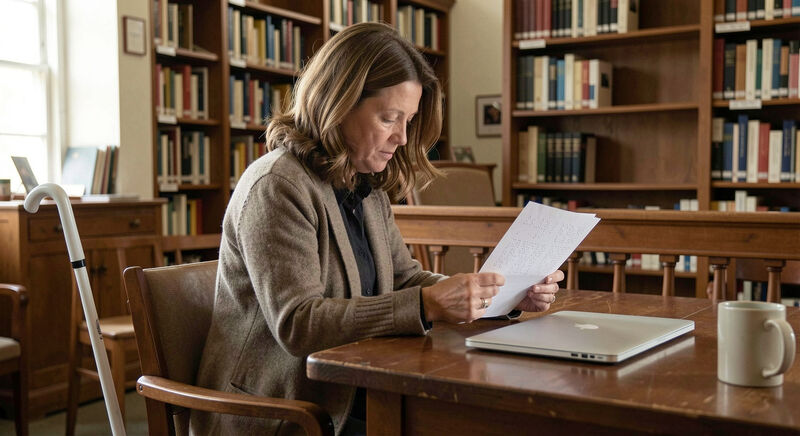
A blind member checks the service time with a screen reader, a program that reads the page aloud or sends it to a braille display. A member with low vision zooms the browser to two hundred percent or runs high contrast colors. Neither visitor sees the site the way the communications team sees it, and both meet the page through its structure rather than its appearance. This guide explains how church websites work with screen readers and zoom, and which habits make the difference between a page that welcomes and a page that stonewalls.
The reference tool in this guide is NVDA, a free and open source screen reader for Windows maintained by NV Access, because it is the one a church team can install in an afternoon and test with, at no cost, on the office laptop.
How does a screen reader actually read a church page?
A screen reader does not start at the logo and move left to right. It walks the page's underlying structure: the title, then the landmarks, then the headings in order, then the content. A member looking for the service time typically opens the headings list and jumps to "Service Times" rather than listening to the page read through. That is why an honest heading structure matters more than any visual layout: a page whose headings describe its content can be navigated in seconds, while a page built from styled text with no headings is a long unbroken reading with no exits.
What happens to text baked into images?
Text inside an image, a sermon graphic with the verse rendered as artwork, a banner with the service times typeset into the picture, is invisible to a screen reader unless the image carries a description. The reader announces "image" and moves on. The rule that follows is simple and absolute: real information belongs in real text. A decorative photo can carry a short description or none at all, but times, addresses, event names and verses never live inside a picture. This one habit, more than any other, decides whether a blind member can use the site.
How should images be described?
Every meaningful image carries an alt text: a sentence that says what the picture shows to someone who cannot see it. "The youth group serving at the food bank on a Saturday morning" tells the story; "IMG 4032" or "photo" tells nothing. The test is utility, not poetry: the description should carry the same information the sighted visitor gets in a glance. A church photography style with people and context, described plainly, gives the blind member the same sense of the congregation the photos give everyone else.
Why do heading levels matter so much?
Headings work like a table of contents, and they only work if they nest honestly: one main heading for the page, second level headings for its sections, third level for subsections. Teams break the system in two ways: choosing heading levels for their font size rather than their meaning, or skipping levels because the design wanted a smaller heading. A screen reader user jumping through such a page gets a broken map. Fixing heading structure is invisible work with immediate payoff, and it belongs in every makeover plan.
What do forms need to say?
A prayer request form or a contact form fails silently for screen reader users when its fields have no labels. A field announced as "edit" gives no clue whether it wants a name, a phone number or a prayer. Each field needs a programmatic label, visible to everyone, tied to the field it describes, and any error message should say which field it concerns, in text, not only in red. The color blindness guide in the accessibility section covers why color alone cannot carry an error, and the principle here is the same: meaning needs words.
How does zoom change the page?
Members with low vision zoom the page rather than listen to it. At two hundred percent, a well built page reflows: text wraps, menus stack, nothing is cut off and nothing needs horizontal scrolling. Pages break when text sits in fixed width containers, when the design hard codes pixel dimensions, or when a slider's frame clips its content. The design habits that survive zoom are the same ones that survive small phones, which is one reason responsive design and low vision access rise and fall together.
What about PDFs, bulletins and print archives?
A scanned bulletin uploaded as a PDF is a photograph to a screen reader: unreadable. The practical rule: anything the congregation must read, order of service, newsletter, event details, exists on a web page in real text, with the PDF as an optional download for printing, never as the only home of the information. A PDF exported from a word processor with real text and heading styles can work, but the web page version costs the same effort and serves everyone, the way the writing guide recommends structuring it.
Can a church test this without hiring anyone?
Yes, and the test takes an hour. Install NVDA from the NV Access site, mute the monitor or close the eyes, and complete three tasks on the church site: find the service time, submit the contact form, and find last Sunday's sermon. The first unguided run teaches a communications team more about its own site than any checklist, because it shows exactly where the page stops answering. Congregations lucky enough to count a screen reader user among their members can go further and invite that person to run the same three tasks, with the team watching quietly.
Where does audio already serve this member?
The blind member's needs overlap with the audio pipeline a church runs anyway: sermon recordings, podcast feeds and the livestream carry the service in sound. Keeping those archives described in text, with titles, dates and scripture references as real text, makes them searchable and navigable for everyone, including the members using the audio for different reasons, a connection the streaming guide draws out. The transcript habit belongs to the deaf and hard of hearing guide; the blind member's need for audio and the deaf member's need for text are the two halves of the same media discipline.