Tools, Hosting and Giving
Live Streaming Church Services
Stream a Sunday service with what the church already owns: one camera, clean audio from the desk, a stable link, and an archive that stays findable.
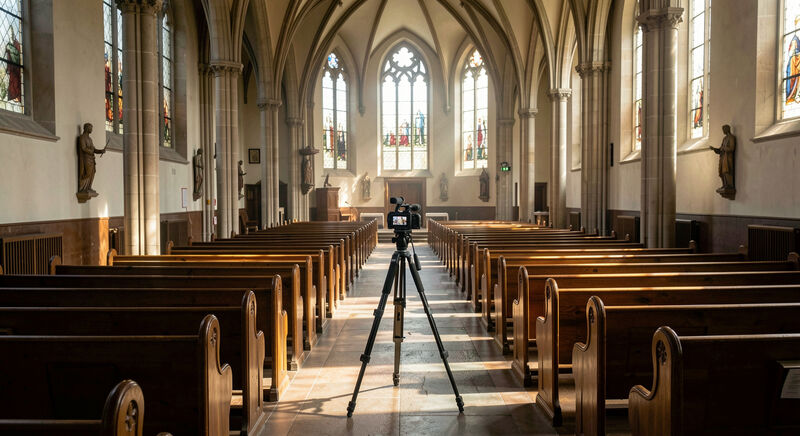
A church livestream succeeds or fails on its audio. The camera can be humble, the angle imperfect, the frame plain, and members will still watch; but if the preacher's voice drops out or the hymns turn to mud, they leave within minutes. This guide walks the streaming chain in the order that matters: sound from the desk first, one camera, a platform the congregation already uses, one stable link, and an archive that stays findable after the service ends.
The assumption throughout is a small team, perhaps two volunteers, using equipment the church largely owns. Everything described here has been run for years by congregations with a tripod and a borrowed laptop.
Why does the sound desk come before the camera?
The sanctuary's room audio, picked up by a camera microphone across the pews, arrives hollow and distant, with coughs as loud as the sermon. The sound desk already holds the mix the room hears; taking a feed from it gives the stream the preacher's microphone, the instruments and the readers, balanced. Most desks offer a spare output or an auxiliary send for exactly this, and a cable from the desk to the streaming device is the single highest value purchase in church streaming. Congregations without a desk start with a microphone placed close to the pulpit and accept a humbler mix.
How much camera does a church need?
One camera, on a tripod, framing the pulpit and a little of the platform, serves most congregations well. The phone in a team member's pocket, mounted on a tripod with a power cable, streams competently for hours. The upgrades worth their money, in order: a clean wide shot before any zooming, a locked exposure so the stained glass does not strobe the picture, and a second camera only once someone has both hands free to operate it. What the stream never forgives is a camera operator walking the aisle mid sermon.
Which platform should carry the stream?
The platform the congregation already watches wins, because the stream goes where the members are rather than asking them somewhere new. For most American churches that means YouTube or Facebook, both of which carry live video at no charge and provide the embed code that puts the player on the church's own site. Google documents the mechanics of going live on its platform, and the YouTube live setup instructions cover the account requirements and the scheduling screens a team meets first. The church site should embed the player rather than send members away, keeping the sermon one tap from the home page.
What does one stable link mean?
A livestream link that changes each week trains members to give up. The working pattern: one address on the church site, the livestream page or the watch page, that always holds tonight's stream and the most recent services. The streaming platforms generate per event addresses, so the church site's page does the stabilizing: members bookmark the church page, the page embeds or links this week's event, and the link a grandmother wrote down in March still works in December. The same page carries the fallback message for the Sunday the platform fails, which it will, once, and the calm apology written in advance.
How does the archive stay alive?
The stream that vanishes after the service never happened, as far as the web is concerned. The archive serves the member in the hospital, the shut in, the skeptic previewing the church from another state, and the search engine indexing the sermon's title. The platform's automatic recording handles the storage; the church site does the finding: a sermons page listing services by date, title and passage, linking the recordings, described as the writing guide structures such pages. An archive without titles and dates is a shoebox of videos; with them, it is the church's teaching record.
Where does the podcast fit?
The same desk feed that carries the stream carries a podcast: the audio, exported after the service, published to a feed that members subscribe to in any podcast app. The podcast costs a few minutes of volunteer time per week and reaches members the video does not, drivers, walkers, the visually impaired member for whom audio is the native medium, the overlap drawn in the low vision guide. The sermon audio also becomes the raw material for the transcript work described next.
What does the stream owe deaf members?
The livestream arrives uncaptioned by default, and a deaf member watching live gets the hymns and nothing else. The platforms' automatic captions improve the archive within hours, and the correction pass belongs to the weekly routine, the discipline the deaf and hard of hearing guide sets out. Congregations with an interpreter solve the live gap simply: the camera frames the interpreter beside the pulpit, and the stream carries both languages at once.
Where does a team start on Monday?
List what the church owns: the sound desk and its spare output, one camera or two phones, a tripod, a laptop, the platform accounts. Pick the platform the members already use, run one full rehearsal with the desk feed and the camera before any announced stream, and write the run sheet: who starts the stream, who monitors the first five minutes, who posts the link, who captions the archive on Monday. One dry run surfaces ninety percent of the failures in advance, and the tools section's platform guide covers where streaming sits in the wider stack when the church is ready to consolidate.